PROV-N is the notation most of us meet first in PROV. The PROV Primer, the specifications and most papers use it, because it is the form of provenance that is easiest to read. Since version 3.2, the PROV Python package reads PROV-N as well as writes it, so anything you can write in the notation you can now load, draw and convert in Python.
Try it
Here is a small piece of provenance in PROV-N. Derek compiles a chart from a dataset.
document
  prefix ex <http://example.org/>

  entity(ex:dataset)
  entity(ex:chart)
  activity(ex:compile)
  agent(ex:derek, [prov:type='prov:Person'])

  used(ex:compile, ex:dataset, -)
  wasGeneratedBy(ex:chart, ex:compile, -)
  wasAssociatedWith(ex:compile, ex:derek, -)
  wasDerivedFrom(ex:chart, ex:dataset)
endDocument
Three lines of Python load it and draw it:
import prov

document = prov.read("example.provn")
document.plot("example.png")
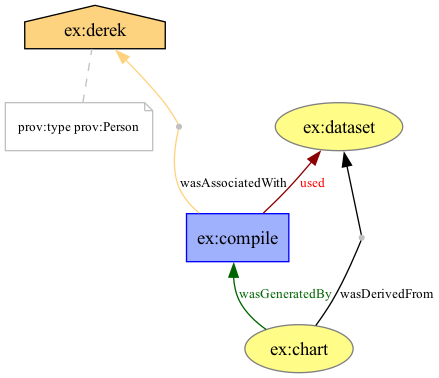
prov.read() recognises PROV-N on its own, so you do not need to name the format. What comes back is an ordinary ProvDocument, which you can add to, merge with other documents or save in any format the package supports.
What you can do with it
- Sketch before you code. Write by hand the provenance you want your application to record, load it, and compare it with what your code produces. A PROV-N file makes a test fixture you can read at a glance.
- Reuse examples. Take an example from a specification or a paper and work with it in Python straight away.
- Convert without Java. Until now, reading PROV-N meant ProvToolbox. Now one command turns a PROV-N file into PROV-JSON, PROV-JSONLD or RDF, and another draws it without any Python:
prov-convert -i provn -f json example.provn example.json
prov-convert -i provn -f png example.provn example.png
When a file is not quite right
Hand-written PROV-N often has a slip or two. A syntax error gives you the line, the column and what went wrong, for example line 2, column 10: cannot resolve 'ex:e1': prefix 'ex' is not declared. If you only need to rescue what a damaged file still holds, read it with profile="lenient", which skips each statement it cannot read, warns you about it and keeps the rest. To check that a file follows the W3C grammar to the letter, use profile="strict":
document = prov.read("draft.provn", format="provn", profile="lenient")
The PROV-N how-to guide covers both.
Get it
Install or upgrade with pip install --upgrade prov. Reading PROV-N needs nothing extra. Drawing needs the dot extra, pip install --upgrade "prov[dot]", and Graphviz on your machine.
Reading PROV-N was first requested in 2018, and it has been one of the longest-standing feature requests on the tracker. I am happy to have finally closed it with this release.
Go Top